


How to Add GenAI to an Existing SaaS Product Without Rebuilding It
A practical guide for founders, CTOs, clinic owners, SaaS companies, and SMB decision-makers.
Most SaaS founders and business owners are asking the same question in 2026:
“How do we add AI to our product without rebuilding everything from scratch?”
The good news is simple:
You do not need to rebuild your SaaS product to make it AI-enabled.
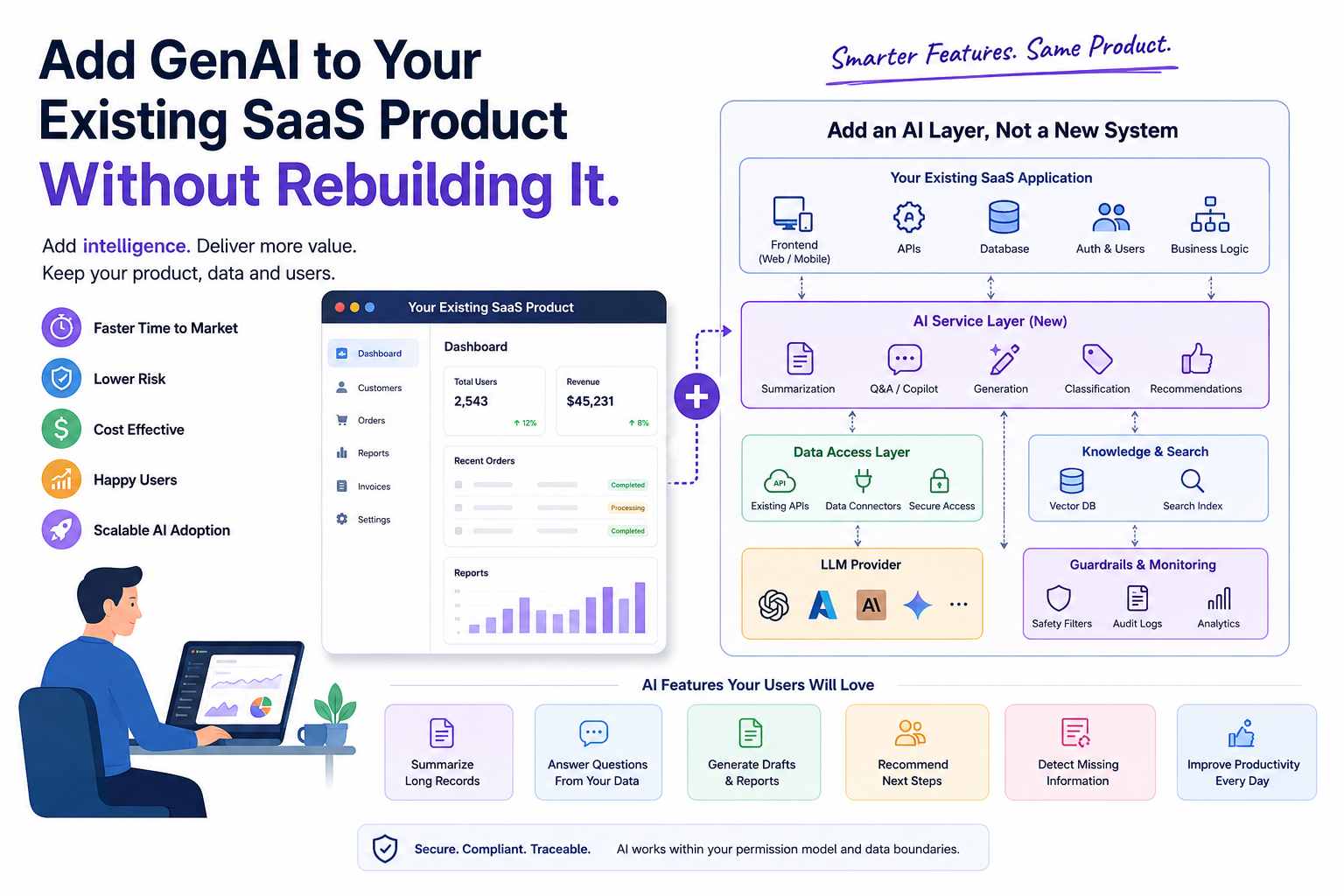
In most cases, GenAI can be added as a smart layer on top of your existing system. Your current product, database, users, workflows, screens, and APIs can remain as they are. AI can be introduced gradually, one feature at a time.
That is the safest, fastest, and most business-friendly way to bring GenAI into an existing SaaS product.
First, What Does “Adding GenAI” Really Mean?
Many people think adding GenAI means adding a chatbot.
But a chatbot is only one use case.
GenAI can help your SaaS product summarise long records, generate reports, answer user questions from existing data, recommend next steps, draft emails, classify documents, and help users complete work faster.
For example, a clinic management system can use GenAI to summarise patient history for the doctor before consultation.
A CRM can use GenAI to suggest the next best follow-up message.
An HR SaaS product can use GenAI to screen resumes and prepare interview notes.
A finance product can use GenAI to explain complex reports in simple language.
A support platform can use GenAI to summarise customer complaints and recommend replies.
In all these cases, AI is not replacing the existing product. It is making the existing product more useful.
The Biggest Mistake: Rebuilding the Product Around AI
Many companies make a costly mistake.
They assume that adding AI means rebuilding the entire SaaS product from the ground up.
That usually leads to delays, confusion, budget overruns, and half-finished AI experiments.
A better approach is this:
Keep the existing SaaS product stable. Add AI features around high-value workflows.
Your current product already has value. It has users, data, business logic, permissions, reports, and workflows.
AI should improve that value, not disturb it.
Think of GenAI as an Intelligence Layer
The simplest way to understand this is to imagine your SaaS product as a working office.
Your existing software is like the office system. It stores records, manages tasks, handles approvals, tracks payments, and generates reports.
GenAI is like adding a smart assistant inside that office.
This assistant can read, summarise, explain, draft, compare, and recommend.
But it does not need to own the entire office.
That is exactly how GenAI should be added to your SaaS product.
The Right Architecture: AI Layer, Not Full Rebuild
A practical GenAI architecture for an existing SaaS product usually includes the following layers.
1. Existing SaaS Application
Your current web app, mobile app, admin portal, APIs, database, authentication, and business workflows remain mostly unchanged.
2. New AI Service Layer
A separate AI service is introduced. This service handles AI-related tasks such as summarisation, generation, classification, recommendations, and retrieval.
3. Data Access Layer
The AI service connects to your existing APIs or database in a controlled way. It should only access the data required for a specific use case.
4. LLM Provider
This can be OpenAI, Azure OpenAI, Anthropic, Gemini, an open-source model, or a private model depending on your security, cost, and compliance needs.
5. Vector Database or Search Layer
For knowledge-based answers, documents, policies, reports, product manuals, or patient records, a vector database can help the AI retrieve the right context before answering.
6. Audit, Guardrails, and Monitoring
Every AI output should be logged, monitored, and reviewed where needed. This is especially important for healthcare, finance, legal, and enterprise products.
This architecture allows you to add AI without disturbing your core system.
Start With One High-Value Use Case
Do not start with the goal of making the whole product AI-powered.
That is too broad.
Start with one workflow where users already spend too much time.
Ask these questions:
- Where are users reading too much information?
- Where are users copying and pasting repeatedly?
- Where are users writing the same type of notes again and again?
- Where are users switching between multiple screens?
- Where are users making decisions from large amounts of data?
- Where are support teams answering the same questions repeatedly?
That is where GenAI can create immediate value.
Healthcare SaaS Example: AI Patient Summary
In a healthcare SaaS product, the first AI feature could be a patient history summary for doctors.
Instead of asking the doctor to open multiple old consultations, reports, prescriptions, and notes, the AI can prepare a short, structured summary before the consultation.
It can show:
- Recent complaints
- Past diagnosis
- Current medications
- Allergies
- Important vitals
- Previous investigations
- Red flags
- Suggested questions for the doctor to ask
This does not require rebuilding the entire clinic platform.
It only requires adding a smart AI component inside the existing consultation screen.
That is a practical AI implementation.
Use Existing APIs Wherever Possible
One of the best ways to avoid breaking your product is to connect AI through existing APIs.
Your SaaS product may already have APIs for users, customers, patients, orders, reports, appointments, tickets, invoices, documents, notifications, payments, and audit logs.
The AI service can consume these APIs instead of directly changing the core system.
For example:
- The existing SaaS API provides patient history.
- The AI service receives that history.
- The AI service creates a summary.
- The frontend displays the summary in a new AI panel.
- The doctor reviews it before taking action.
The original patient record remains untouched unless the doctor chooses to save something.
This reduces risk and protects the existing workflow.
Add AI Features as New UI Components
You do not need to redesign the entire product.
In many cases, you can add AI as small, useful UI components inside existing screens.
AI Summary Panel
Shows a short summary of long records.
Ask AI Button
Lets the user ask questions about the current screen or record.
Generate Draft Button
Creates a draft email, report, prescription note, support reply, or invoice description.
AI Suggestions Widget
Recommends next steps based on available data.
AI Validation Box
Shows missing fields, possible errors, or items requiring review.
AI Search
Lets users search in natural language instead of using complex filters.
This approach is user-friendly because AI appears exactly where the user needs help.
Do Not Give AI Full Control on Day One
This is very important.
AI should not directly perform critical business actions without user review.
For example, AI should not automatically approve a loan, finalise a diagnosis, send a legal notice, delete records, change billing, reject a claim, modify patient treatment, cancel an order, or update financial entries.
At the beginning, AI should assist, not decide.
AI suggests. Human reviews. System acts.
This is especially important in healthcare, finance, legal, insurance, and enterprise SaaS.
Build Guardrails From the Beginning
GenAI can be powerful, but it needs boundaries.
A good AI implementation should clearly define:
- What data AI can access
- What data AI should never access
- What actions AI can perform
- What actions require human approval
- How outputs are verified
- How prompts are managed
- How errors are handled
- How sensitive data is protected
- How user permissions are respected
- How every AI action is audited
For example, if a doctor is using AI inside a clinic platform, the AI should only access patient data that the doctor is authorised to view.
If a support user is using AI inside a SaaS product, the AI should not expose private billing data unless that user already has permission to access it.
AI should follow the same permission model as the existing application.
Use RAG When AI Needs to Answer From Your Data
One of the most common GenAI patterns is called RAG, which stands for Retrieval-Augmented Generation.
In simple terms, RAG means:
Before AI answers, first give it the right information from your own system.
This is useful when AI needs to answer from product documentation, company policies, patient history, knowledge base articles, legal documents, support tickets, reports, SOPs, training material, and internal manuals.
Without RAG, the AI may answer generally.
With RAG, the AI can answer based on your actual business data.
For SaaS products, RAG is one of the most practical ways to add GenAI without changing the entire product architecture.
Keep AI Output Traceable
A common problem with AI is that users may ask:
“Where did this answer come from?”
That is why AI outputs should be traceable.
Wherever possible, show source documents, related records, confidence indicators, last updated date, data used to generate the answer, and warnings if information is incomplete.
For example, instead of showing only:
“The patient has a history of hypertension.”
A better AI output would show:
“The patient has a history of hypertension based on previous consultation notes from March and May.”
This builds trust.
For business users, trust is more important than fancy AI features.
Measure AI Success With Business Metrics
Do not measure AI success only by how impressive the demo looks.
Measure it by business impact.
Useful metrics include:
- Time saved per task
- Reduction in support tickets
- Faster report generation
- Improved user engagement
- Reduced manual data entry
- Lower operational cost
- Better customer response time
- Fewer missed follow-ups
- Faster onboarding
- Higher product stickiness
For example, if AI reduces the time required to prepare a consultation summary from 10 minutes to 1 minute, that is real business value.
If AI helps a sales team respond to leads faster, that can directly impact revenue.
If AI helps SaaS users complete tasks without training, it improves adoption.
Recommended Step-by-Step Approach
Step 1: Identify the Best AI Use Case
Choose one workflow where AI can save time, reduce effort, or improve decision-making.
Do not start with ten features. Start with one painful problem.
Step 2: Check Data Availability
Find out whether the required data already exists in your system.
AI is only useful when it has the right context.
Step 3: Design the AI Flow
Define what the user will do, what data AI will receive, what output AI will generate, and what the user can do with that output.
Step 4: Build a Separate AI Service
Do not mix AI logic directly into the existing core application.
Create a separate AI service that can evolve independently.
Step 5: Connect Through APIs
Use existing APIs wherever possible.
This keeps your current product stable.
Step 6: Add a Small UI Component
Add the AI feature inside the existing screen where users need it most.
Avoid unnecessary redesign.
Step 7: Add Guardrails and Audit Logs
Track prompts, outputs, user actions, errors, and approvals.
This is important for quality, security, and compliance.
Step 8: Test With Real Users
Let a small group of users try the AI feature.
Collect feedback and improve the output quality.
Step 9: Measure Business Impact
Track whether the AI feature is actually saving time or improving outcomes.
Step 10: Expand Gradually
Once the first AI feature works well, move to the next workflow.
That is how a SaaS product becomes AI-enabled safely.
Example: Adding GenAI to a Clinic SaaS Product
A clinic SaaS product may already have patient registration, appointment booking, doctor consultation, vitals, prescriptions, lab reports, billing, and follow-up records.
Instead of rebuilding the product, AI features can be added one by one.
Phase 1: AI Patient Summary
AI summarises patient history before consultation.
Phase 2: AI Consultation Note Draft
AI prepares a draft consultation note based on doctor inputs.
Phase 3: AI Follow-Up Reminder Suggestions
AI suggests when a patient may need a follow-up.
Phase 4: AI Report Explanation
AI explains lab reports in simple language for doctor review.
Phase 5: AI Clinic Insights
AI gives clinic owners insights such as frequent complaints, follow-up gaps, and patient visit trends.
This is a phased AI roadmap.
No full rebuild is needed.
Example: Adding GenAI to a SaaS CRM
A CRM product can add AI features such as lead summary, email draft generation, meeting note summary, follow-up recommendation, customer sentiment analysis, deal risk detection, and natural language search.
The CRM does not need to be rebuilt.
AI can sit on top of existing leads, activities, notes, and communication history.
Example: Adding GenAI to an HR SaaS Product
An HR SaaS product can use AI for resume summarisation, candidate matching, interview question generation, employee policy assistance, HR ticket classification, offer letter draft generation, and performance review summary.
These features can be added module by module.
What Founders and CTOs Should Remember
GenAI implementation is not only a technology decision.
It is a product strategy decision.
The goal is not to say:
“We have AI.”
The goal is to say:
“Our users can now complete important work faster, with less effort, inside the product they already use.”
That is the real value.
What Clinic Owners and SMBs Should Remember
You do not need to understand every technical detail of AI.
You only need to ask:
- Which task is taking too much time?
- Which process depends too much on manual reading or writing?
- Which staff members are overloaded?
- Which customer or patient experience can be improved?
- Which decision needs better information at the right time?
That is where AI can help.
AI should not complicate your business.
It should make your existing system easier to use.
Final Thought
Adding GenAI to an existing SaaS product does not mean rebuilding the product.
It means adding intelligence to the right places.
Start small. Choose one workflow. Use existing APIs. Keep humans in control. Add guardrails. Measure the impact. Then expand.
The companies that win with AI will not be the ones that add the most features.
They will be the ones that add the most useful intelligence into real business workflows.
Need Help Adding GenAI to Your SaaS Product?
At SmartRabbitz, we help SaaS companies, clinics, SMBs, and product teams add practical GenAI features to their existing platforms without rebuilding everything from scratch.
Whether you want to add AI summaries, copilots, RAG-based knowledge assistants, workflow automation, AI-powered reports, or intelligent decision support, the best approach is to start with one high-impact use case and build from there.
Your product may already have the data.
Your users may already have the problem.
AI can become the layer that connects both.